
In the digital age, advertising has taken a significant shift from traditional media to online platforms. While this transition has opened up new opportunities for businesses to reach a wider audience, it has also introduced new challenges, one of which is ad fraud. This is where TrafficGuard comes into play. This comprehensive review will provide an in-depth look at TrafficGuard, an award-winning ad fraud protection software designed to safeguard your digital marketing campaigns against invalid traffic.
As of the time of writing, the history of TrafficGuard is not readily available on their website. However, their numerous awards and recognitions, including “Most Effective Anti-Fraud Solution 2020” and “Best Anti-fraud Solution in Advertising 2020,” attest to their industry standing and commitment to providing top-tier ad fraud protection. These accolades demonstrate TrafficGuard’s dedication to innovation and excellence in the field of ad fraud protection.

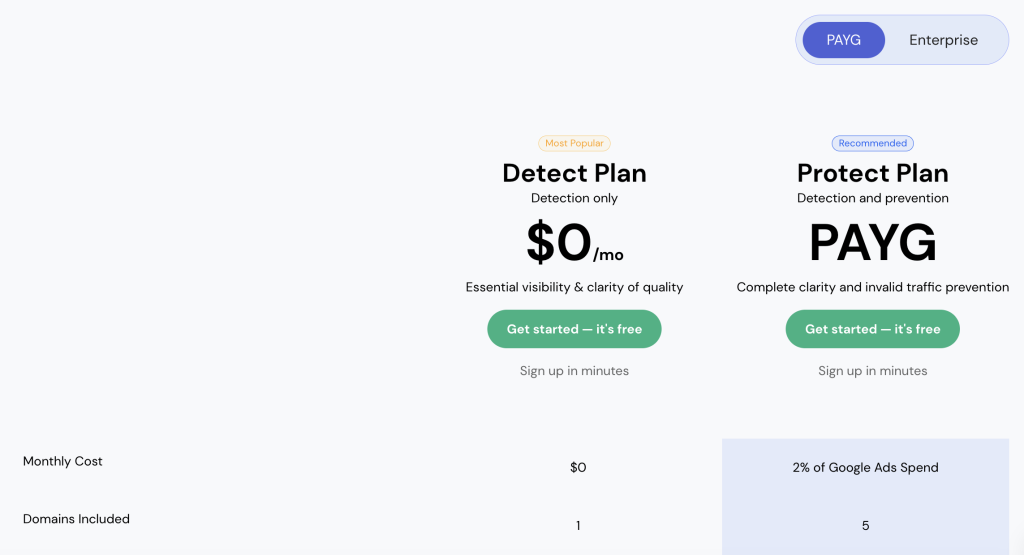
Trafficguard offers four pricing plans:
Detect Plan (Free): This plan offers detection only and includes unlimited ad clicks, one ad account, and support for up to 10 users. It also provides 24/7 monitoring, real-time analytics, and IPv6 support. This plan is ideal for small businesses or those just starting out with digital advertising.
Protect Plan (Pay-As-You-Go): This plan offers both detectionand prevention. The cost is 2% of your Google Ads Spend per month. It includes unlimited ad clicks, support for up to five ad accounts, and 10 users. It also offers dedicated agency access, access to a fraud analyst, and priority support. This plan is designed for businesses with a higher ad spend and those who want comprehensive protection against ad fraud.
Setting up TrafficGuard is a straightforward three-step process:
Layer TrafficGuard Across All Advertising Channels: The first step involves integrating TrafficGuard across all your advertising channels. This ensures that your campaigns on Google Search, Mobile UA, Social Networks, and Affiliate marketing are all protected.
Deploy the AI/ML Troops: Once TrafficGuard is set up, the software uses machine learning algorithms to monitor your campaigns and detect any invalid traffic. This includes identifying patterns of fraudulent activity and blocking bots and other non-human traffic.
Achieve Better Results with the Same Ad Spend: By eliminating invalid traffic, TrafficGuard allows you to reinvest your ad spend into bigger, better campaigns. This means you can achieve better results without increasing your budget.
While the specific setup and onboarding process isn’t detailed on the TrafficGuard website, the software is designed to be user-friendly and easy to implement across all your advertising channels. The process generally involves layering TrafficGuard across your advertising channels, after which the AI/ML algorithms are deployed to monitor and protect your campaigns. The software provides real-time analytics, giving you instant insights into your campaign’s performance
TrafficGuard is a comprehensive ad fraud protection platform that offers a suite of features designed to help businesses optimize their ad spend and enhance the performance of their digital advertising campaigns. Here’s a more detailed look at what TrafficGuard brings to the table:
Continuous Monitoring: TrafficGuard provides 24/7 monitoring of your advertising campaigns. This constant vigilance ensures that any invalid traffic or suspicious activity is detected in real-time, preventing fraudulent clicks from draining your ad budget.
Real-Time Analytics: With TrafficGuard, you gain immediate insights into your campaign’s performance. The platform offers real-time analytics, allowing you to understand how your ads are performing at any given moment. This feature enables you to make data-driven decisions and adjust your advertising strategy as needed, enhancing the effectiveness of your campaigns.
IPv6 Support: In keeping with the latest internet infrastructure, TrafficGuard supports IPv6, the most recent version of the Internet Protocol (IP). This ensures that your campaigns are protected and optimized for the modern digital landscape, providing you with peace of mind and enhanced security.
Dedicated Agency Access: If you’re an agency managing multiple clients, TrafficGuard has you covered. The Protect Plan offers dedicated agency access, allowing you to manage campaigns for multiple clients more effectively. This feature can streamline your operations and make managing various campaigns a breeze.
Priority Support: Customer support is crucial when dealing with something as complex as ad fraud. That’s why the Protect Plan includes priority support. This ensures that your queries and issues are addressed promptly, minimizing any potential disruption to your campaigns.
These features work together to provide a robust and comprehensive solution for ad fraud, helping businesses protect their ad spend, improve campaign performance, and ultimately, drive better results.
TrafficGuard is ideal for businesses and marketers who run digital advertising campaigns and want to maximize their ad spend by eliminating invalid traffic and ad fraud. This includes businesses of all sizes, from small businesses to large enterprises. It’s also suitable for agencies managing campaigns for multiple clients. If you’re looking to improve the ROI of your digital advertising campaigns, TrafficGuard is a tool worth considering.
TrafficGuard may not be the best fit for businesses or individuals who don’t run digital advertising campaigns, as its primary function is to protect against ad fraud and invalid traffic. Additionally, businesses with a very low ad spend might not fully benefit from the paid plans.
Easy to Set Up: Users appreciate the simplicity of setting up TrafficGuard for their clients. They also like the broader network of analysis points compared to Google Ad only click fraud detection platforms.
Effective Fraud Detection: Users have reported a significant reduction in their PPC costs by eliminating fraudulent clicks in their Google Ads PPC campaigns. They also appreciate the automatic blocking of duplicate IPs and other unwanted users.
Valuable Insights: Users have found TrafficGuard’s dashboard clear and informative, providing valuable insights into their Google Ads account and collecting click data.
Customer Support: Users have praised TrafficGuard’s customer support team for being helpful and quick to respond.
Limited Free Trial: Some users have mentioned that the free trial doesn’t fully showcase the potential of the software. They would like to see more features during the trial period to better understand what the software can provide.
User Experience: Some users have found the features a bit confusing initially. They also mentioned that they would like more information on how the software functions.
Pricing: A few users have found the pricing to be a bit high, especially as they increase their budgets. They suggested an agency price option for managing multiple clients.
Lack of Facebook Ads Integration: One user wished for Facebook Ads integration, which is currently not available.
In conclusion, TrafficGuard is a powerful ad fraud protection software that offers robust protection against invalid traffic and ad fraud. With features like 24/7 monitoring, real-time analytics, and AI/ML-driven protection, it’s designed to help businesses maximize their ad spend and improve the performance of their digital advertising campaigns. Whether you’re a small business or a large enterprise, if you’re running digital advertising campaigns, TrafficGuard is a tool worth considering. Its pricing model, based on ad spend, ensures that businesses of all sizes can benefit from its featuresand protect their campaigns from ad fraud.
I am text block. Click edit button to change this text. Lorem ipsum dolor sit amet, consectetur adipiscing elit. Ut elit tellus, luctus nec ullamcorper matti pibus leo.
